If you’ve worked on more than a few ecommerce stores, you’ve probably seen the same thing play out.
Either internal links are barely there at all, or they’re everywhere. Every repeated word turned into a link, every page shouting for attention. One approach leaves pages isolated and the other leaves users overwhelmed.
The problem is with intent. eCommerce Internal linking gets treated like a checkbox or a plugin setting instead of being considered part of a broader, complete SEO process.
In this guide, we’ll walk through what internal linking for ecommerce should look like, where stores tend to go wrong, and how to build a structure that feels natural to users and still pays off in search.
Quick Summary: 5 Internal Linking Moves to Steal
Most ecommerce stores improve dramatically by focusing on a handful of repeatable internal linking moves that guide shoppers naturally through the catalog. Here are some tips that can help you do the same:
- Let collections do the heavy lifting
Collections are the natural hubs of an ecommerce site. When internal links connect collections to related categories and products, they create clear browsing paths and prevent product pages from feeling like isolated dead ends. - Turn high-traffic pages into intentional “senders”
Pages that already attract organic traffic should actively guide users toward collections or products with the most growth potential. Instead of scattering links randomly, use these high-visibility pages to direct attention where it matters most. - Use content as a bridge between discovery and purchase
Blog posts, guides, and educational content shouldn’t exist in isolation. They should naturally link to relevant collections, products, and related articles so readers can move smoothly from learning to exploring the catalog. - Treat every link as a navigation cue
The best internal links behave like subtle directions for the shopper. Each link should answer the question: Where should I go next? If the link doesn’t help a visitor move forward, it probably doesn’t belong there. - Keep the structure clean and intentional
Internal linking improves when you remove unnecessary noise. Regularly prune repetitive links, repair under-linked pages, and ensure the homepage clearly points visitors toward the few collections you want them to explore first.
What Makes a Good Internal Linking Structure?
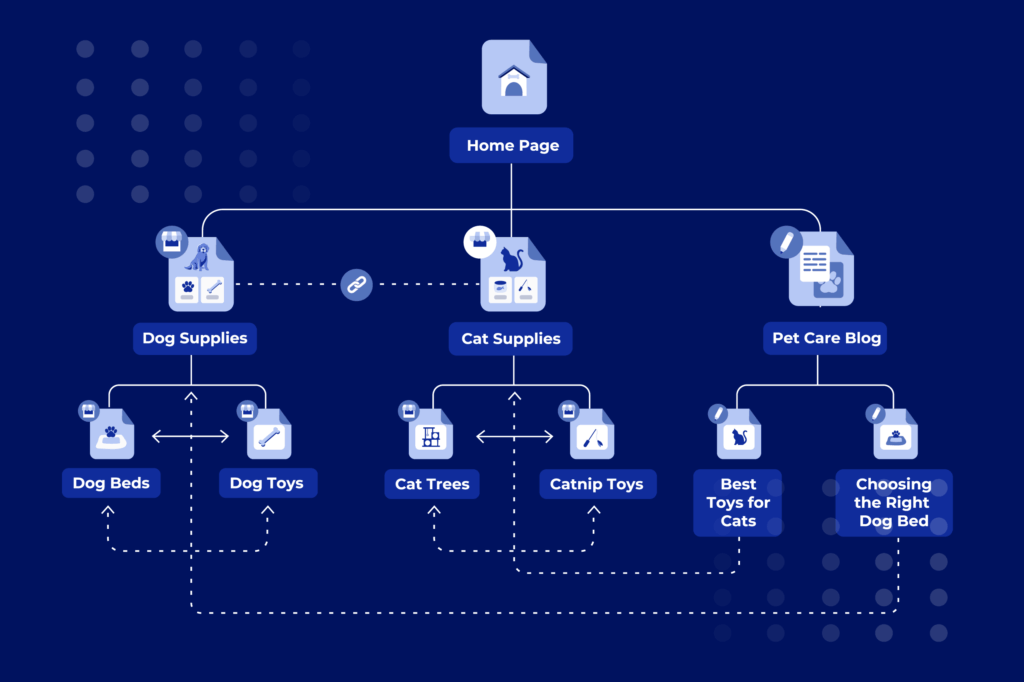
A good internal linking structure tries to help shoppers. Every link should exist for a reason to add context, suggest a relevant next step, or make it easier for someone to explore your store. When links make logical sense to users, SEO value tends to show up on its own.
At a high level, most ecommerce stores work best with a simple flow:
Homepage → Collections → Products → Blog, supported by thoughtful blog-to-commerce cross-links. That’s the foundation of how to set up internal linking for ecommerce SEO. The structure matters, but how you apply it matters more.
User-First Principles
If a link helps someone compare options, understand a category better, or discover something relevant, it belongs. If it exists only because a keyword looks important, it usually doesn’t. This mindset avoids both extremes, under-linking and over-linking and keeps internal linking for ecommerce feeling natural instead of mechanical.
Homepage as Hub
The homepage is a navigational starting point.
Rather than trying to link to everything, the homepage should point users toward your most important collections or categories. These are typically the pages that represent how shoppers think about your products.
From an internal linking perspective, the homepage sets direction. It just needs to send users and authority to the right places. Menus and footers support this, but they don’t replace contextual links placed within the page itself.
Linking Strategy Across Store Pages
Collections are where internal linking really starts to compound. They act as hubs that connect products below them and related collections beside them. Product pages should never feel like dead ends; when it makes sense, they can guide users to other relevant products or broader collections.
Blog content plays a different role. It supports discovery. Educational posts can naturally introduce collections or products when the context fits. These blog-to-commerce links work best when they feel like recommendations.
When each page type plays its role, the entire store starts to feel connected and that’s what a strong internal linking structure actually looks like.
Top 5 Internal Linking Best Practices
The internal linking patterns that consistently work for ecommerce are simple, repeatable, and rooted in how shoppers naturally browse a store. When these patterns are applied together, internal linking starts supporting both usability and organic growth instead of feeling like an SEO add-on.
1. Strong links between related collections
Treat collections as the hubs of your ecommerce site. Link related collections together so shoppers can move across categories without starting their journey over. These connections also strengthen relationships between top-level pages, allowing authority to flow from category hubs down to individual product pages.
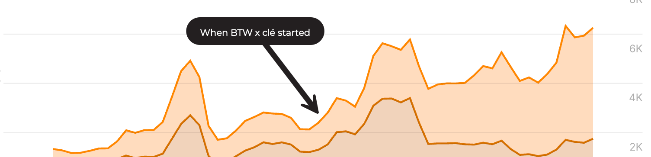
A good example of this comes from our work with clé tile, a luxury artisan tile brand that had recently migrated from Magento to Shopify. The site’s collections and products weren’t well connected, which weakened organic visibility for high-intent searches like “cement tile” and “terrazzo tile.”
One of the biggest issues was weak information architecture and internal linking across collections and products. After restructuring the site and strengthening those internal pathways, clé steadily regained organic traction, ultimately driving a 178% increase in organic revenue and a 250% lift in conversions while rebuilding rankings for high-intent product searches.
2. Strong links between related product pages
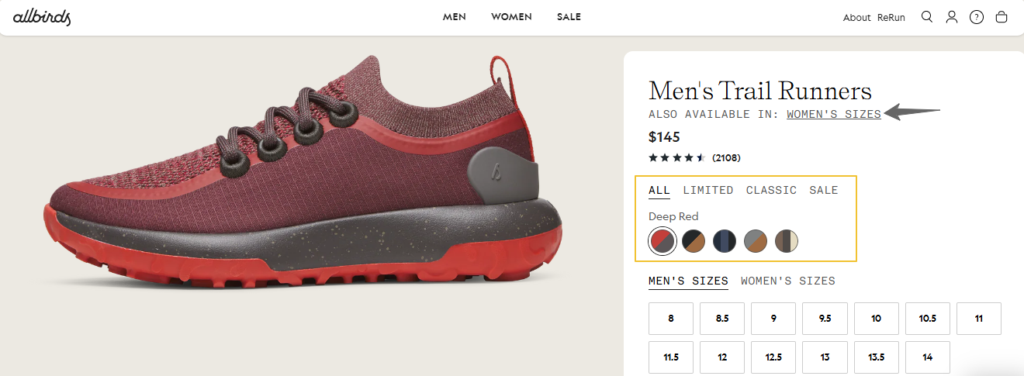
Prevent product pages from becoming dead ends. Link products that share similar use cases, variations, or complementary functions so shoppers can compare options at the exact moment they’re deciding. Place these links where they feel like helpful suggestions rather than interruptions.
For example: Footwear brand Allbirds regularly surfaces alternative styles and color variations on product pages, helping shoppers compare similar shoes without navigating back to the main category page.
3. Cross-link between related blog posts
Connect related blog posts so content reinforces topical relevance and builds deeper content pathways. Linking related guides, tutorials, or product explainers mirrors how topic clusters for SEO are designed to work, while helping readers naturally discover more relevant content.
4. Link blog content to collections and products
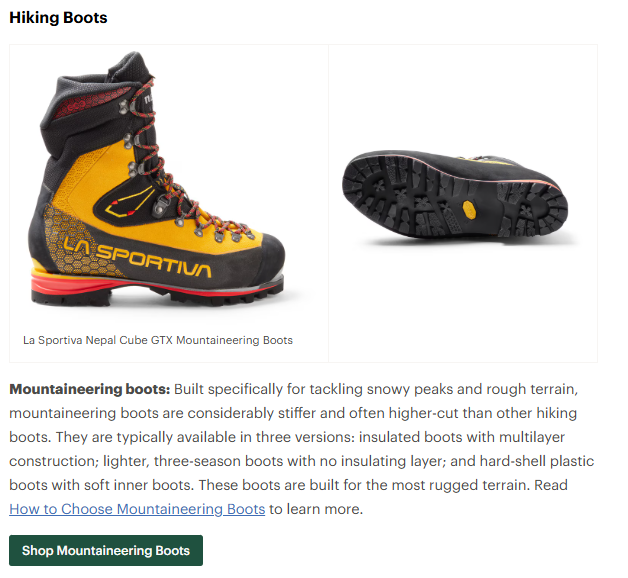
Use blog posts to guide discovery across your catalog. Whenever a post introduces a problem, product category, or use case, link directly to the most relevant collections and products so readers can move smoothly from learning to exploring.
For example, Retailer REI connects educational guides like “How to Choose Hiking Boots” directly to relevant product collections, turning informational searches into product discovery.
5. Use the homepage to anchor the system
Treat your homepage like a central navigation hub. Instead of linking to everything, direct visitors toward the few collections that matter most. From there, collections and products can take over, creating a clear and logical internal linking flow across the store.
For example, Furniture retailer IKEA uses its homepage to direct visitors into major categories like storage, bedroom furniture, and kitchen systems, creating a clear entry point into the site’s internal linking structure.

Prioritizing Pages for Links
Stop treating every page equally. Map where links should flow from and where they should land so your internal linking actually moves the metrics that matter.
Think of your internal linking system in two roles:
- Senders: pages that already attract organic traffic
- Receivers: pages with ranking potential but limited visibility
When these two work together, internal linking stops being decorative and starts driving measurable results.
Let High-Traffic Pages Do the Heavy Lifting
Identify the pages that already attract attention. These pages rank, generate clicks, and accumulate authority over time.
Use them deliberately. Instead of letting them scatter links across low-value pages, guide users and authority toward pages that still have room to grow such as emerging collections, categories stuck on page two, or product groups you want to push further.
When links originate from pages people already visit, they pass both SEO value and real user attention.
Send Authority Toward Pages With Upside
Look for pages sitting just outside top rankings or targeting valuable search queries.
These pages often convert well once users reach them, but they lack internal support. Route links from strong senders into these pages to help search engines recognize their importance and to guide users toward them faster without relying on navigation menus or site search.
Why Visualizing Link Flow Changes Everything
This idea becomes much clearer when you visualize it.
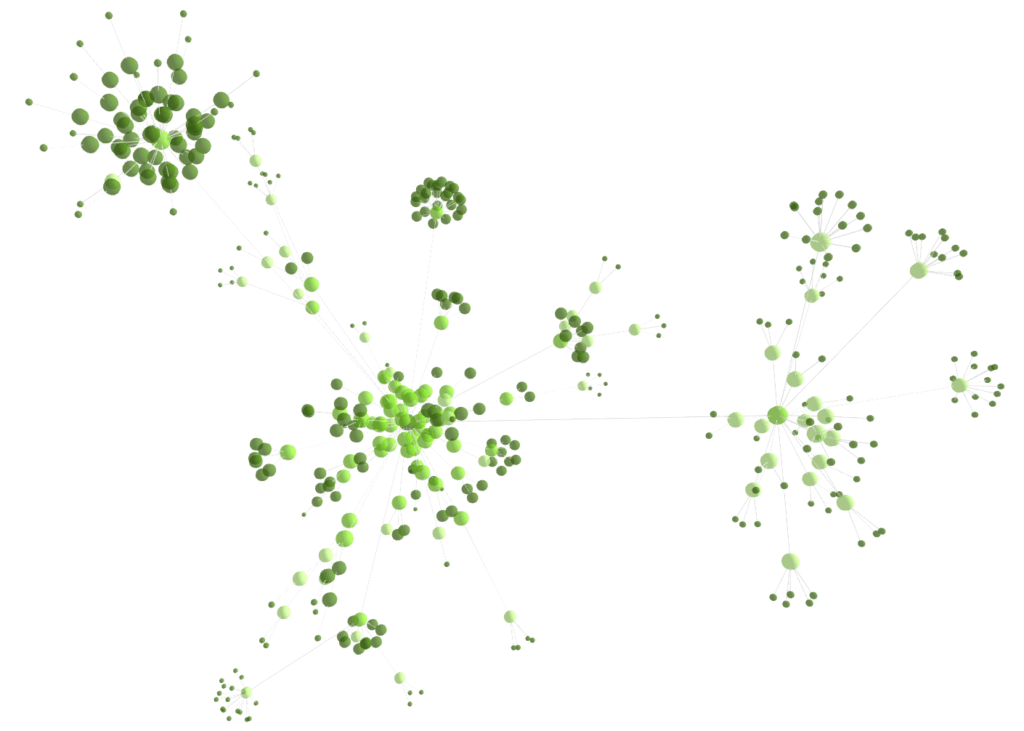
When you view the structure this way, weak spots appear immediately. Pages earning strong backlinks often distribute links too broadly, while pages that need support remain barely connected at the edges of the graph.
Visualizing the structure makes prioritization obvious and shows exactly where internal links should reinforce the system.
Common Internal Linking Mistakes Ecommerce Brands Make
Internal linking is one of those things most ecommerce stores think they’ve handled until you look closely. When you do, the same patterns show up across store after store. Below are the most common internal linking mistakes ecommerce brands make:
Most Shopify Stores Either Under-Link or Over-Link
Most Shopify stores don’t get internal linking slightly wrong; they get it wrong in one of two extremes. Some barely use internal links at all. Product pages live in isolation. Collections don’t connect to each other. Blog posts educate but never guide readers toward products. The site functions, but nothing flows.
Others go too far. Automated tools turn every repeated word into a link. The same anchor appears multiple times on a single page. It feels unnatural to users and forced to search engines.
Good internal linking for successful Shopify SEO sits in the middle. Links should be added because they make sense in the buying journey.
Treating Internal Links as an SEO Trick Instead of a User Decision
A common mistake is treating internal links like a keyword tactic. “This page is important, so let’s link it everywhere.”
But internal links exist to help users move through the site. This is one of the core reasons why internal linking is important for ecommerce SEO. If a link doesn’t add context or suggest a clear next step, users won’t click it, and it won’t carry much value anyway.
If it feels forced, it probably is.
Assuming Menus and Footers Are “Enough”
Menus and footers help define structure, but they don’t replace contextual, in-body links.
Many stores stop at navigation links and call it a strategy. It isn’t. The real value comes from links inside content that’s present on the homepage, in collection descriptions, and within blog posts where users are already paying attention.
Ignoring Collection-to-Collection and Product-to-Product Links
Most stores only link downward: homepage to collections, collections to products, which is costly given how much organic performance often depends on strong Shopify collections SEO.
Related collections and relevant product-to-product links make browsing easier and keep users moving. When those links are missing, users backtrack, search again, or leave.
Linking Without Any Sense of Priority
Pages with strong traffic should send authority. Pages with growth potential should receive it. When everything gets the same treatment, internal linking loses impact.
Letting Automation Make Strategic Decisions
Automation isn’t the issue. Losing control is.
Tools shouldn’t decide placement or frequency for you. Internal links should be intentional — placed where they help users, not where software happens to allow them.
Forgetting That Internal Linking Is About Flow
Every mistake above comes down to one thing: broken flow.
Internal linking is about guiding users naturally to what’s next. When that flow breaks, both user experience and organic growth suffer.
Shopify-Specific Nuances and Pitfalls
Strategically, the fundamentals of internal linking don’t change just because a store runs on Shopify. Links should still be logical, contextual, and useful for shoppers. Where Shopify does differ is in how those ideas get implemented. Most problems I see are about platform defaults quietly getting in the way.
Large Catalogs
As catalogs grow, internal linking has to zoom out. When a store has dozens or hundreds of products, trying to manage links at the individual SKU level quickly becomes unmanageable. That’s where many brands get stuck, such as obsessing over product-to-product links while ignoring the bigger picture.
The shift needs to happen at the collection level.
Strong top-level categories and collection pages should become the backbone of the internal linking system. These pages group products by intent. When collections are well-structured and well-linked, they naturally pass value and traffic down to the products inside them.
This approach also keeps things clean for users. Instead of overwhelming shoppers with endless product links, collections act as clear decision points. Users browse broadly first, then narrow down. Internal linking should mirror that behavior.
For larger catalogs, staying high-level is practical. Collections do the heavy lifting, and the rest follows.
Theme and App Limitations
The most common Shopify pitfall I see is over-reliance on default themes and template apps.
Out of the box, most Shopify themes aren’t designed to encourage meaningful links between collections and products. They focus on layout and conversion basics. As a result, many stores end up with clean-looking pages that barely talk to one another.
The same issue shows up with generic template apps. They often prioritize speed and simplicity, but they don’t think deeply about internal linking patterns. That’s how you end up with stores where collections don’t reference related collections, and product pages feel like dead ends.
To move past this, stores usually need one of two things:
- Custom development that allows intentional link placement where it actually helps users
- Tools that make proven internal linking patterns easy to implement, without locking merchants into rigid layouts or automated decisions
Quick Win Tactics
Once the fundamentals are clear, the fastest wins usually come from pattern-based internal linking.
That means links that feel like recommendations.
- Related collections.
- “You might also enjoy” modules.
- Product grids placed inside relevant blog content using a lean page builder.
These patterns work because they show up where users are already making decisions, not buried in navigation or hidden behind templates.
Simple exposure still matters too. Consistent visibility of top-level categories in the header and footer continues to do its job. But the real gains come from contextual links that sit closer to the product grid and category content where shoppers are comparing options and deciding what to explore next.
This is exactly where many Shopify stores struggle.
Out of the box, most themes don’t encourage strong links between collections and products. Developers often skip this layer entirely, which means top-level pages don’t share SEO value the way they should. That gap is what led to building Break The Web’s Related Collections app.
The idea is simple: surface relevant collections directly on collection and product templates, in a way that feels natural to users and clean to search engines.
One Action This Week
If you’re overwhelmed and only have time for one internal linking action, this is it. Install the Related Collections app from the Shopify App Store and add it to your key collection templates.
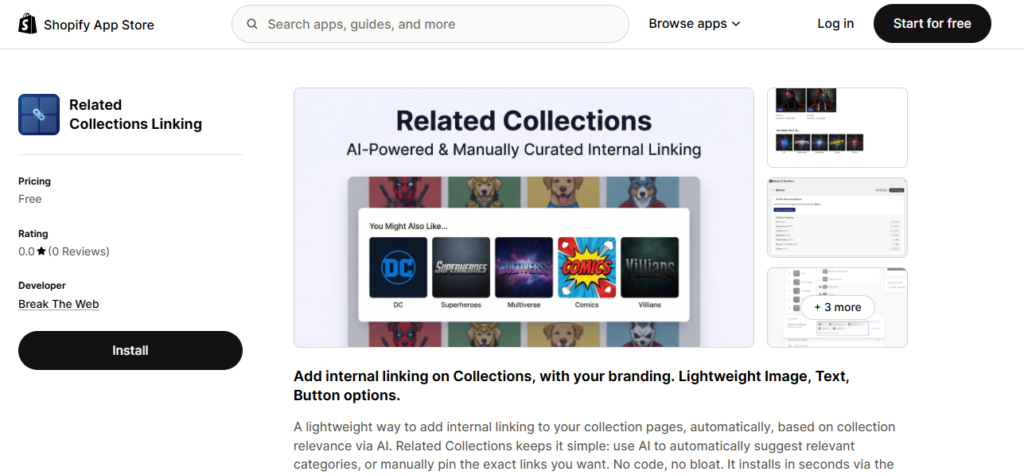
The app exists for one reason: most Shopify stores weren’t creating links between collection and product pages consistently, which meant SEO value stayed trapped instead of flowing across the site. The goal was to make cross-linking almost effortless.
What matters here is control. A black-box system doesn’t decide placement. You choose where the block appears above the product grid, below it, or even in the footer so links align with your design and user experience.
Rethinking How Internal Linking for Ecommerce Is Done
Internal linking is the structural backbone of any ecommerce store.
When links are intentional and user-first, pages stop competing with each other and start working together. Collections grow stronger, discovery improves, and SEO becomes more stable.
The good news is you don’t need to rebuild your store or overthink this. Most of the gains come from fixing a few repeatable patterns: linking collections to collections, products to products, and guiding users toward what makes sense next.
Install the Related Collections app from Break The Web to turn these internal linking principles into something you can actually implement this week.