You’re about to walk into a strategy meeting, and you know the question is coming: “How’s our SEO doing?”
If you don’t have a confident answer, this post is for you.
Or, maybe you’ve been told to “run an SEO audit.” But what does that actually mean, and what are you supposed to be looking for?
Most Shopify SEO audit checklists barely skim the surface. This one’s different!
It’s built for in-house marketers who want a clear, actionable strategy they can follow right now, and backed by real examples from audits that uncovered hidden traffic blockers, fixed structural issues, and drove measurable results.
Use it to spot missed opportunities, streamline your SEO efforts, and walk into your next meeting ready to lead the conversation.
How to Approach a Shopify SEO Audit (And Why Most Miss the Mark)
You don’t need another checklist that tells you to “optimize your titles” or “check your meta descriptions.” You need a clear view of what’s actually holding your store back, and a roadmap that ties technical fixes to real outcomes.
As Jason Berkowitz, Founder and SEO Director at Break The Web, puts it,
“Simple pass/fail audits are not enough. We need to be able to understand the impact something might have on SEO, and whether that potential impact is accurate based on proven frameworks.”
Most audits stop at pass/fail checklists. This one goes further by tying every issue to potential SEO impact, implementation effort, and scope—so you know what actually deserves attention.
Here’s what an effective Shopify SEO audit should look like.
What most Shopify SEO audits get wrong
When marketers audit their Shopify site, they often focus on the wrong things, or stop at surface-level issues. Here are a few common missteps:
- Fixating on page speed scores instead of crawlability or indexation issues that are actually limiting organic visibility.
- Checking title tags but ignoring duplicate content problems caused by product variants or tag pages.
- Running a crawl without looking at how internal linking is (or isn’t) guiding users and search engines to high-value pages.
- Auditing “SEO content” without checking if it matches buyer intent or drives traffic to converting pages.
- Creating pass/fail reports that list hundreds of issues without explaining the actual SEO impact or prioritization.
Not every issue flagged in an audit deserves your attention. An effective Shopify audit does show you problems, but it also shows what’s impacting performance so you can prioritize fixes that will lead to better rankings and more revenue.
Why Shopify-specific nuances matter
Shopify isn’t like other platforms. If your audit doesn’t account for its quirks, you’ll miss what’s actually holding your store back.
- Collection pages often get overlooked, but they’re some of the highest-opportunity URLs on your site. If they’re thin, unstructured, or competing with filters or tag pages, you’re likely leaving rankings (and revenue) on the table.
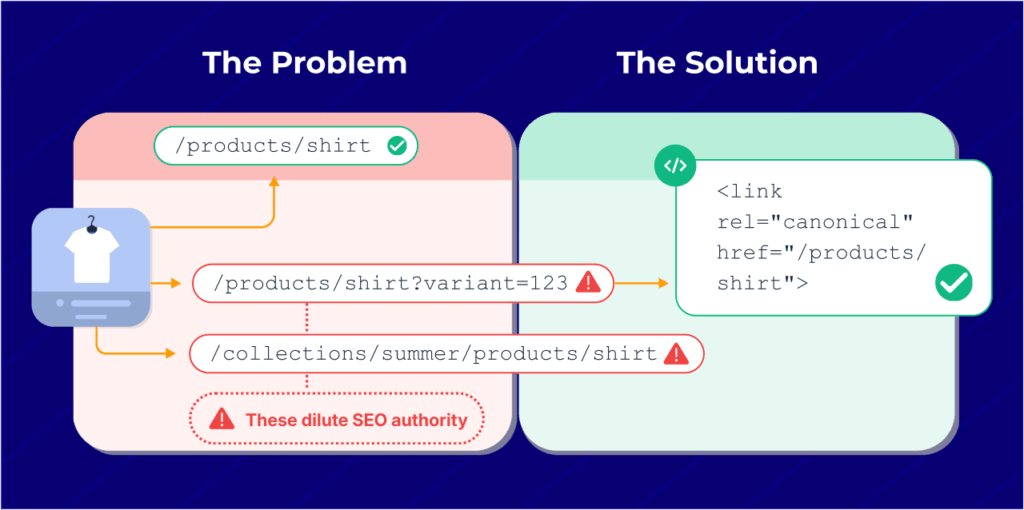
READ: How to Improve Shopify Collection SEO: Lessons From 100+ PLP Optimizations - Duplicate content is common thanks to how Shopify handles product variants and URLs. If you’re not careful with canonical tags and indexation settings, you may be unintentionally diluting authority across multiple versions of the same page.
- Navigation structure can make or break crawlability. Shopify menus can get complex fast, and if search engines can’t easily follow your site’s hierarchy, neither can your customers.
These are just a few of the platform-specific challenges to watch for. If you’re using a one-size-fits-all checklist, chances are you’re missing them.
Audit philosophy: Impact over perfection
When you’re responsible for SEO results, it’s easy to get buried in to-do lists. But not everything flagged in an audit is worth your time, and not every fix will impact performance.
This checklist focuses on high-impact areas. The goal isn’t to check every box, but to find what’s limiting traffic, conversions, or crawlability, and prioritize from there.
Sometimes that means ignoring dozens of minor issues in favor of fixing one structural problem that affects your entire site.
Shopify Audits, Without The Fluff!
Get your hands on a Shopify Technical SEO Audit without the fluff. Completely done for you and prioritized based on SEO impact.
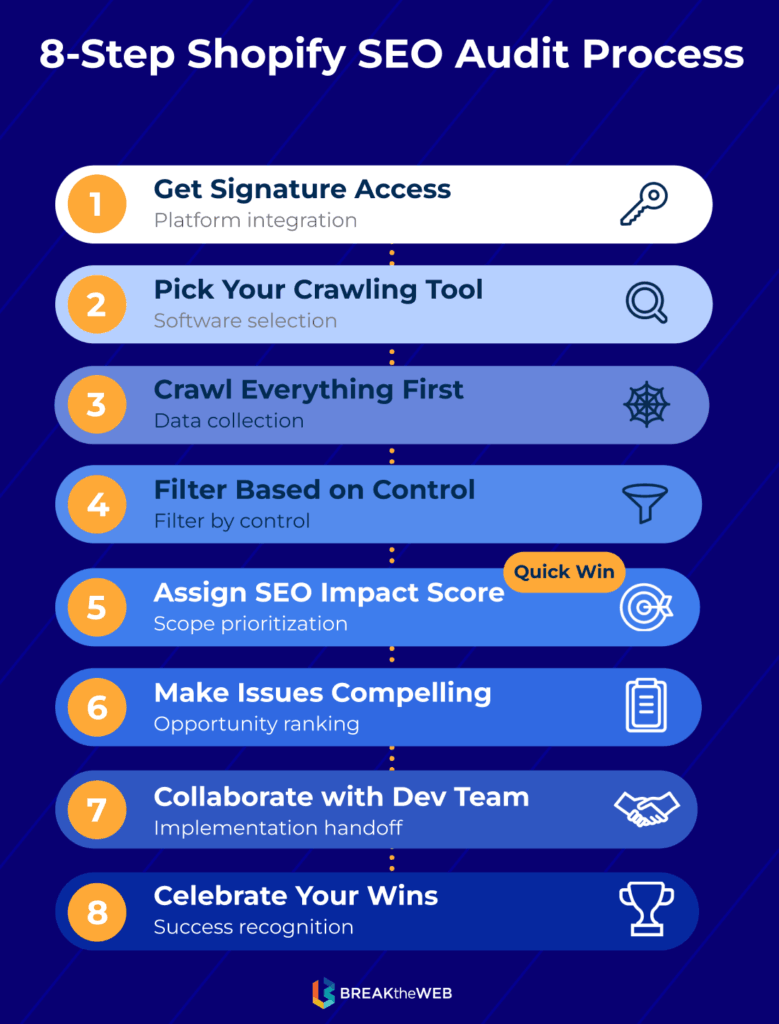
8 Step-by-Step Process for SEO Auditing Your Shopify Store
Before diving into what to look for, here’s the actual workflow you should follow when conducting a comprehensive Shopify SEO audit.
1. Get signature access for proper crawling
This is a game-changer and often overlooked. “First, get signature access to be able to properly crawl. This is a new feature over the last month which is amazing,” says Jason.
Shopify recently introduced a feature that allows you to grant crawling access without dealing with password protection or exposing your entire store. This lets crawling tools see your site exactly as search engines do.
Watch How To Set It Up: How to Crawl Shopify Stores using Custom Signatures
2. Pick your crawling tool
Choose a tool that fits your budget and technical comfort level:
- Screaming Frog : desktop-based, great for sites under 500 URLs on the free version
- Sitebulb: visual reports, excellent for client presentations
- JetOctopus: cloud-based, handles massive crawls efficiently
Each has its strengths, but they all work if configured properly.
3. Crawl everything first, filter later
Don’t limit your crawl prematurely. “Crawl as much as possible, to be able to filter out later,” recommends Jason.
This ensures you don’t miss issues hiding in unexpected places like old campaign pages, orphaned URLs, or app-generated content.
4. Filter based on what you actually control
Once you have your crawl data, filter out issues you can’t realistically fix or that won’t impact performance:
- 3rd-party app bloat: Excessive JS/CSS from apps is often outside your control without removing the app entirely
- Shopify server issues: Things like server response times or CDN configuration aren’t always actionable for in-house teams
- Theme limitations: Some issues require custom development that may not be worth the investment
“Filter based on what’s in your control,” explains Jason.
“Third-party app issues like excessive JS/CSS caused by an app aren’t likely in the brand’s control, and the same goes for Shopify server issues—so it’s not worth reporting on things that don’t matter.”
If an issue lives inside Shopify’s servers or deep in a 3rd-party app you can’t realistically change, it doesn’t belong in your primary findings. The report should focus on what your team can act on and what will move the needle.
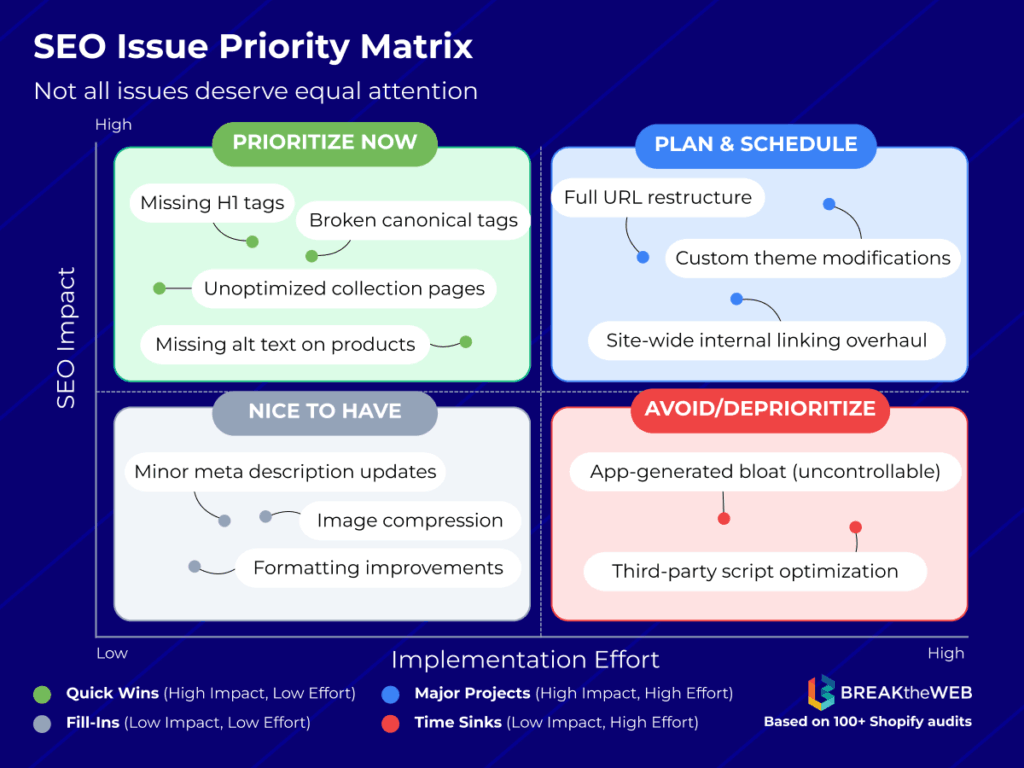
5. Assign an SEO impact score to each issue
Create a priority framework that considers:
- SEO impact potential (high, medium, low)
- Implementation difficulty (easy, moderate, complex)
- Pages affected (single page vs. site-wide issue)
“Assign a potential SEO Impact Score, SEO priority, etc.,” advises Jason.
This isn’t guesswork—the framework is built from our hundreds of Shopify SEO audits where we’ve tested which issues actually move rankings and revenue, not just scores in tools.
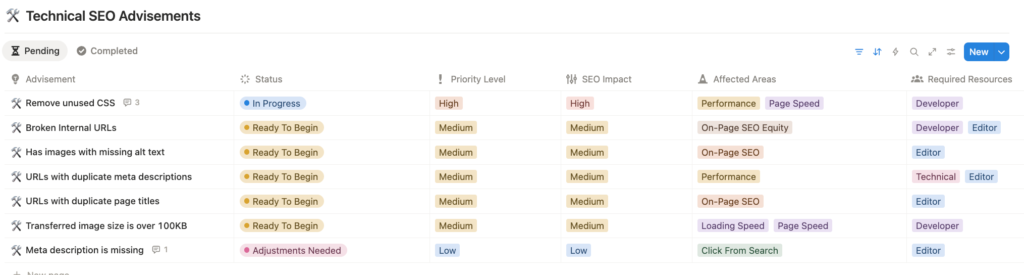
And using a system like Notion with custom properties can help track issues, assign owners, and monitor progress. This makes it easier to communicate with stakeholders and developers about what matters most.
6. Make each issue compelling and actionable
For every issue you flag, document:
- What the issue is: be specific
- Why it matters: tie it to rankings, visibility, traffic, and/or conversions
- How it impacts SEO: use data when possible
- How to solve it: clear, actionable steps
- Where it exists: list affected URLs or sections
“Make the issue compelling with details, explaining what the issue is, why it’s important, how it impacts SEO, how to solve it, and where the issue exists,” says Jason.
Vague recommendations like “improve your H1 tags” don’t get prioritized. “12 collection pages are missing H1s, including your top 3 revenue-driving categories, which limits their ability to rank for target keywords,” gets action.
7. Collaborate with your dev team (and respect their priorities)
Here’s something critical to remember:
“SEO comes second to design, copy, UX, so SEO fixes should come at the expense of user experience/conversions,” notes Jason. Your fixes should never come at the expense of user experience or conversions.
When working with developers:
- Frame SEO changes as improvements to user experience, not just ranking factors
- Be realistic about implementation timelines
- Prioritize fixes that benefit both SEO and users
- Don’t be precious about every recommendation because some aren’t worth the dev time
8. Celebrate your wins
Running a comprehensive SEO audit on Shopify is hard work. When you implement changes and see results, take a moment to acknowledge them.
Shopify SEO That Has Leadership Say “Whoaaa!”
We have the framework and the case studies to show how to make a difference in your Shopify e-commerce store.
What to Look for in an Effective Shopify SEO Audit
Now that you understand the process, here’s what to check in each area of your audit.
Technical SEO: What’s slowing Google down?
Technical issues on Shopify aren’t always obvious. Many audits stop short at “page speed” or “broken links,” but the real traffic-killers often hide in how Shopify structures your URLs, collections, and theme files.
For first-time auditors: “If you’re performing a Shopify SEO audit for the first time, I suggest pairing crawling tools with Google Search Console to identify crawl errors and indexation issues.
Many Shopify stores often have hundreds of unnecessary pages indexed, such as tagged pages, filtered URLs, and app-generated pages. Resolving these technical issues is essential for building a solid foundation,” recommends Jason.
Avoid treating every red flag as equal—your job is to separate noise from issues with real SEO leverage.
Here’s what to check first:
- Duplicate and low-value URLs from product variants and tag pages: Shopify typically does a really great job auto-handling product variants. Be sure to double-check canonicals tag to ensure duplicate product pages are being seen/detected. If these get indexed, they dilute your authority and compete with primary URLs. Use canonical tags and
noindexrules to prevent this, and make sure your XML sitemap isn’t surfacing them. - Theme file bloat and crawl inefficiencies: Many Shopify themes include unused scripts, app leftovers, or oversized JS files. Use Chrome DevTools and coverage reports to flag what’s actually loading, and talk to your developer about what can be deferred or removed.
- App-generated URLs cluttering your index: Some SEO, review, or personalization apps quietly generate landing pages that get indexed but add no value. Audit these pages and clean them up with noindex tags or sitemap exclusions.
Common technical issues to flag:
When auditing Shopify sites, Jason looks for issues like “a logo wrapped in h1, missing h1s, missing titles, missing descriptions, missing alt text.”
- Logos wrapped in H1 tags: This steals the H1 from your actual page content. Your H1 should describe the page, not be your site logo on every page.
- Missing H1s entirely: Every page needs one (and only one) H1 that clearly describes what the page is about.
- Missing title tags: Critical for rankings. Every indexable page needs a unique, keyword-optimized title.
- Missing meta descriptions: While not a direct ranking factor, these impact click-through rates from search results.
- Missing alt text on images: Important for accessibility and image search rankings, especially for product photos.
The goal here is clarity. Make sure Google is spending its time on your most valuable pages, not crawling noise.
On-page SEO: Collections, products, and internal links that convert
Most Shopify sites are struggling because key pages are misaligned with how people search and how they shop. This part of the audit is where rankings and conversions start to connect. Here’s what to check:
- Misaligned collection pages that don’t target real keywords: Collections often default to category names that make sense to your team but don’t match how buyers search. Use tools like Google Search Console and Ahrefs to identify whether these pages are ranking for anything meaningful. If not, rework titles, headers, and intro copy to align with high-intent, bottom-of-funnel terms.
READ: How to Improve Shopify Collection SEO: Lessons From 100+ PLP Optimizations - Product pages with duplicated or generic descriptions: Shopify makes it easy to scale product uploads, but thin or duplicate content on product pages weakens your entire domain. Prioritize writing custom descriptions for top-selling or high-margin items first.
- Internal linking that doesn’t guide users or search engines to high-value pages: Look at how your homepage, navigation, and collection pages are linking to individual products or cornerstone content. Make sure high-converting URLs are no more than 2–3 clicks from your homepage, and that you’re using keyword-relevant anchor text where it makes sense.
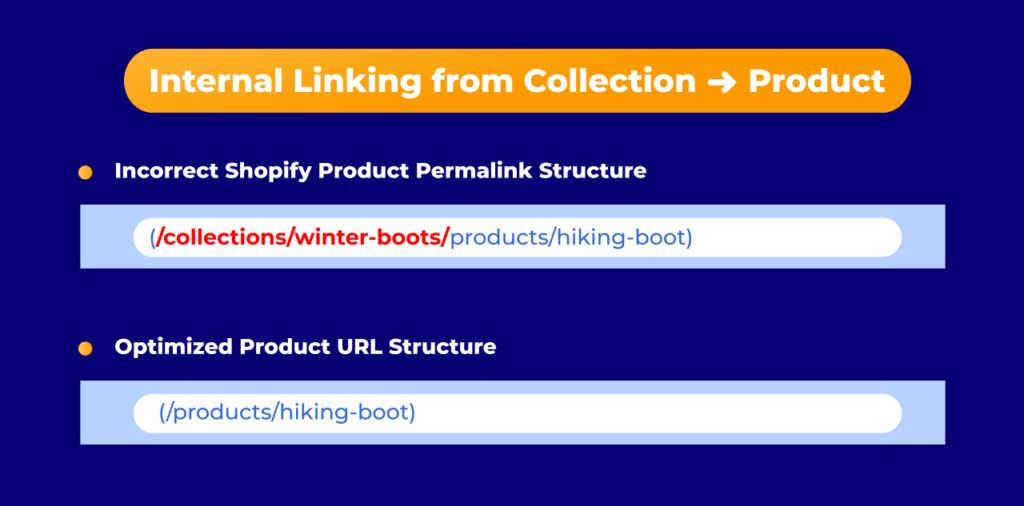
Shopify App: Relation Collections Internal Linking - The Shopify permalink issue: One common problem Jason highlights in successful Shopify stores is how collection pages link to products. “Sometimes by default Shopify and standard Shopify themes might have specific collection pages with the grid or the list of specific products which then create a brand new longer URL,” he explains. “Typically you’ll have your collection name which then when clicked links to the product page which follows this longer structure which appends the product URL as well after the collection name.”
As Jason notes:
Even though the canonical of the longer form URL does in fact go to the optimized URL, it does eat up a lot of bandwidth and resources from all the different tools—Google being one of them. Google has to first crawl this page, then of course browse the HTML, see the canonical, and then go and crawl the canonical page.
The fix? Work with your developer to modify your theme files so collection pages link directly to product URLs (e.g., /products/shirt) rather than the longer collection-appended version (e.g., /collections/summer/products/shirt). High-performing Shopify stores like ColourPop, Gymshark, and Onewheel all implement this correctly.
Crawl traps created by filters and pagination: Shopify’s filtering options (color, size, etc.) often generate crawlable URLs that don’t need to exist. Unless you’ve optimized those filter pages for specific long-tail queries, they should be excluded from indexing and de-prioritized in your internal linking structure.
Keyword & Content Alignment: Are You Targeting What Actually Sells?
Ranking doesn’t matter if it’s not driving the right traffic. In this part of the audit, look for disconnects between your content, your keyword targets, and what your audience is actually searching for with intent to buy.
- Blog content that drives traffic but not revenue: Many Shopify brands rank for top-of-funnel keywords but fail to support collection or product pages that convert. Audit your content to see which posts lead to product discovery and which are attracting unqualified visitors who bounce.
- Keyword targeting that doesn’t reflect buyer intent: Ranking for broad terms like “natural skincare” might look good on paper, but terms like “best moisturizer for sensitive skin” usually convert better. Review your pages to make sure they’re aligned with long-tail, bottom-of-funnel queries, especially on collections and product pages.
- Content gaps around high-converting queries: Use GSC, Ahrefs, or customer search behavior to identify common searches your site isn’t capturing. Then, build or optimize content specifically to match that intent, like comparison guides, solution pages, or optimized FAQs on product pages.
- Internal linking that doesn’t support keyword themes: If your blog talks about a topic your product solves, link it. But make sure anchor text reflects the target keyword, not vague CTAs like “click here.” Use internal links to reinforce topic clusters and guide traffic toward conversion pages.
UX & CRO: Fixing SEO bottlenecks in your navigation and flow
Good SEO has to connect with how people navigate, evaluate, and buy. Shopify sites often suffer from missed conversion opportunities that stem directly from structure or flow issues. Connect organic traffic with actual outcomes and make sure users can move from search to purchase without friction.
- Navigation that hides high-converting pages: Many stores bury their best-selling categories or campaigns under vague menu labels or deep dropdowns. Review your nav to make sure it leads with high-intent paths, not internal team structures.
- Landing pages that don’t support decision-making: If users land on a product or collection page and still have questions about fit, ingredients, compatibility, or comparisons, they’ll bounce. Look at top-entry pages and ask: does this page make it easy to say “yes” or take the next step?
- Inconsistent or unclear calls to action: If your CTA language changes across pages or lacks clarity (“Explore More,” “Get Started”), you’re making users think harder than they need to. Keep CTAs consistent, visible, and specific to the action you want.
- Lack of supporting content where it’s needed most: Conversion-driving content isn’t just for blogs. Consider adding educational elements (like mini-guides, product comparisons, or customer quotes) to key SEO landing pages, especially high-ranking collection or product pages.
Performance tracking: Metrics that prove you’re winning
You can run the best SEO audit in the world, but if you’re not tracking the right metrics, you won’t know what’s working or what to do next.
Organic traffic growth that prioritizes the right pages: Use Google Search Console and audit your Google Analytics to track which URLs are gaining traction. Growth to low-intent blog posts or no-conversion product pages isn’t the win it looks like. Prioritize visibility for collection pages and content with buyer intent.
Top-ranking pages are actually converting: Rankings without revenue don’t mean much. Review your high-traffic SEO landing pages and pair keyword data with conversion performance to see where you may need to improve layout, CTAs, or messaging.
Keyword tracking reflects real opportunities, not vanity metrics: Don’t waste time tracking broad, unachievable terms. Focus on keywords tied to high-converting intent, especially those on page two that could move up with a targeted push.
Attribution models align with how your audience shops: SEO often supports multi-touch journeys. Make sure you’re using models (like data-driven attribution) that show how organic traffic influences conversions, even if it’s not the last click.
Performance data should inform your priorities, not just validate effort. When you know what’s working, and why, your audit turns into a roadmap.
Shopify SEO Audit Checklist for In-House Marketers
Need to get your team aligned fast? This checklist breaks down the full audit into a skimmable format you can use during internal reviews or planning sessions.
Technical SEO
- Signature access granted for accurate crawling
- Duplicate product or tag-based URLs are excluded or properly canonicalized
- Low-value pages (filters, variants, app-generated URLs) are noindexed or removed from crawl paths
- Sitemap includes only indexable, high-value pages
- Theme and app bloat is identified and minimized
- Logos are not wrapped in H1 tags
- Every page has exactly one H1 tag
- All indexable pages have unique title tags
- Meta descriptions are present on key landing pages
- Product images include descriptive alt text
On-Page SEO
- Collection pages use keyword-aligned H1s and intro copy
- Product descriptions are unique, descriptive, and conversion-friendly
- High-value pages are no more than 2–3 clicks from the homepage
- Internal links support crawl flow and user journeys
- Collection pages link directly to product URLs (not collection-appended versions)
Keyword & Content Alignment
- Target keywords reflect buyer intent, not just search volume
- Top content drives qualified traffic and links to relevant products
- Content gaps are filled with long-tail, conversion-driven topics
- Internal anchor text reinforces keyword relevance
UX & CRO
- Navigation highlights high-converting categories and products
- Landing pages support decision-making with clear, helpful content
- CTAs are consistent, visible, and action-oriented
- High-ranking pages include CRO elements like reviews or comparisons
Performance Tracking
- Organic growth is mapped to pages that convert
- Keyword tracking reflects business opportunities, not vanity metrics
- Attribution models show SEO’s role in the full funnel
- High-traffic pages are monitored for ranking and conversion performance
Ready for a Shopify SEO Plan You Can Act On?
Running a Shopify SEO audit is time-consuming, technical, and easy to get wrong without platform-specific experience. If you’ve worked through this checklist and need help prioritizing what actually matters, or you want a second set of eyes on your findings, we can help.
With over 15 years in the world of SEO and over 10 years in e-commerce specifically, our Shopify SEO agency has the process, the framework and the case studies to turn data into actionable insights and execution that actually moves the needle.
Shopify SEO That Has Leadership Say “Whoaaa!”
We have the framework and the case studies to show how to make a difference in your Shopify e-commerce store.